Best self improvement apps for iPhone in 2026

The best self-improvement app for you is the one that helps with a specific job. You may want to track habits, keep a journal, learn from books, or figure out which area of life to work on first. Those are different needs, so a long list of features does not tell you which app to choose.
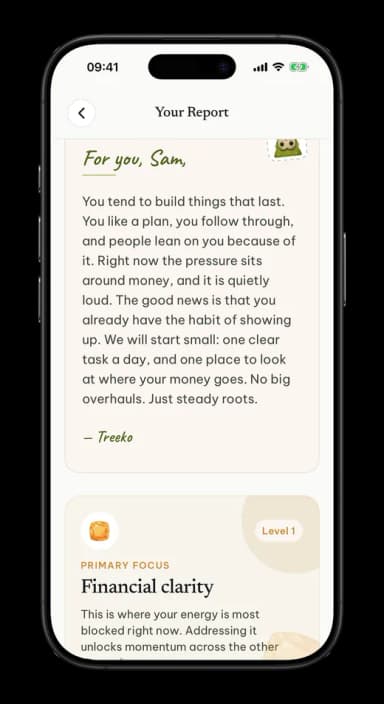
This guide compares five iPhone apps by the job they are built around: Habitica, Day One, Blinkist, Rosebud, and Rooted. Their Apple listings show that each is free to download with in-app purchases. Plans, trial terms, and availability can change, so check the current listing before you subscribe. Rooted is made by the publisher of this article, and we include it because it offers a different starting point: a short assessment followed by a written report and a daily task.
If you already know which area you want to work on, you may also want to read why self-improvement advice often fails or what a real self-assessment tells you. If you are not sure where to begin, the comparison below can help you choose a first tool.
Compare apps by the job you want done
| App | Best suited to | What you do in it | Platform and price model |
|---|---|---|---|
| Habitica | Turning tasks into a game | Add habits, recurring tasks, and to-dos, then earn in-game rewards by completing them | iPhone and iPad; free download with optional in-app purchases |
| Day One | Keeping a personal journal | Write entries, add media, use prompts, and revisit earlier entries | iPhone, iPad, and Apple Watch; free download with in-app purchases |
| Blinkist | Getting the main ideas from nonfiction books | Read or listen to short summaries and explore a library of titles | iPhone and iPad; free download with subscription purchases |
| Rosebud | Guided journaling and reflection | Write or speak entries, then use prompts and app feedback to continue reflecting | iPhone and iPad; free download with in-app purchases |
| Rooted | Finding a starting area for personal growth | Complete a short assessment, read a report across six areas, and receive a small daily task | iPhone; free download |
This table describes each app's main use, not a ranking of quality. A tool that suits a journaling routine may be a poor fit if what you need is a concrete daily action. Start by asking what you want the app to help you do this month.
Habitica: make your task list more playful
Habitica turns habits, recurring tasks, and to-dos into a role-playing game. You create an avatar and earn in-game rewards when you check off real tasks. The app also offers groups and shared challenges for people who like working alongside others.
Choose Habitica if game elements make a list more inviting and you want to define your own tasks. It can help you record the behaviours you already know you want to practise. Before setting up a large set of recurring tasks, start with a few. If the list becomes difficult to maintain, reduce it until you can use it without much setup.
Habitica is not designed to decide which part of your life needs attention. You supply the tasks and the categories. That makes it flexible, but it also means you need an idea of what you want to work on.
Day One: keep a journal you can revisit
Day One is a digital journaling app. It supports text entries, photos, audio, prompts, and ways to search or revisit earlier notes. Its current App Store listing says the app has a free tier and optional paid plans, with versions for iPhone, iPad, and Apple Watch.
Choose Day One if recording your thoughts or preserving memories is the main activity you want to build. You can write freely, use a prompt when you need a starting question, or keep separate journals for different parts of life. A journal is useful when you want to look back at what happened and what you noticed.
If you want a simple way to start, pick one recurring moment, such as the end of the workday. Write three lines: what happened, what mattered, and what you want to remember. You do not have to turn every entry into a lesson.
Blinkist: sample nonfiction ideas in short sessions
Blinkist offers short summaries of nonfiction books in text and audio. It is built for people who want an introduction to a book's central ideas or want to sample topics before choosing what to read in full. Its App Store listing shows free download with paid subscription options, and supports iPhone and iPad.
Choose Blinkist if learning from books is the habit you want to make easier. It can help you use a short commute or break to explore a subject. A summary is a starting point, not a substitute for every detail in a full book. If an idea matters, find the original source and decide whether you want to study it more closely.
To make the reading useful, write down one idea and one question after a session. Then choose whether to test the idea in your work or read the full book. Without a next step, it is easy to collect summaries without using them.
Rosebud: journal with guided reflection
Rosebud combines journaling with prompts and app responses. The App Store listing describes text and voice journaling, personalised prompts, and reflection tools. It is available for iPhone and iPad, with in-app purchases.
Choose Rosebud if a blank page makes it hard to start and you want questions to guide an entry. A prompt can help you move from a general thought to a recent example. If the app offers a suggestion that does not fit, you can skip it and write in your own words.
As with any digital journal, read the privacy information and decide what you are comfortable storing in an app. You can keep entries brief and avoid including details you do not need for your own reflection.
Rooted: get a view across six areas, then choose a task
Rooted begins with a short assessment and produces a written report across six areas: Self-Direction, Connection & Communication, Financial Clarity, Growth & Skill, Purpose & Meaning, and Body & Energy. It then suggests a small daily task for the area that needs attention.
Choose Rooted if you have several possible areas to work on and want a starting point before you build a routine. It differs from a blank journal or a user-created task list because the report helps name an area first. The app's daily task gives you a concrete action to try.
For example, if you are trying to improve your routines, the report might help you see whether the next step belongs to Self-Direction, energy, or another area. You can explore the Self-Direction hub, the Growth & Skill hub, the Purpose & Meaning hub, or the Body & Energy hub to see how those areas are described.
We make Rooted, so this comparison includes our own app. It may not be the right fit if your main need is a private archive of daily memories, a game around a to-do list, or book summaries. Choose it when the question "Where should I start?" matters more than adding another tracker.
How to choose an app you will keep using
Name the job before downloading
Finish this sentence: "I want an app that helps me ___." Use a verb. Track, write, read, plan, or choose are useful answers. "Improve my life" is too broad to guide a download.
Match the tool to your starting point
If you know the habit, try a tracker. If you want a record, try a journal. If you want to learn, try a reading tool. If you have several possible priorities and cannot pick one, choose a guided assessment. The first app you try does not have to become your permanent system.
Test it with one week of real use
Do not set up every feature on day one. Use the central feature for a week. Add one task, write a few entries, or complete one assessment. At the end of the week, ask whether it helped you take the action you wanted.
Check the cost and privacy terms
The apps in this comparison show optional purchases in their iPhone listings, but the available plans and prices may differ by region and change over time. Review the current price, renewal terms, cancellation steps, and privacy details before starting a paid plan or adding personal information.
Frequently asked questions
Which self-improvement app is best for habits?
Habitica focuses on habits and tasks with game elements. If you want the app to suggest what to practise, compare that approach with Rooted's assessment and daily task.
Which app is best for journaling?
Day One focuses on journaling and keeping entries over time. Rosebud adds guided prompts and app responses. Try the one whose writing flow feels easiest to return to.
Are these apps available on Android?
This comparison focuses on their iPhone versions. Platform support can change, so check the app's current official listing for devices in your region.
How many self-improvement apps should I use?
Start with one app for one need. Add another only if it serves a different purpose and you can keep up with both without extra effort.
If you want to see what Rooted's six-area assessment says about your starting point, Take the free test.
See which of your six roots needs attention. Take the free self-assessment in the Rooted app.